Showing posts with label T420. Show all posts

Sunday, March 24, 2013

ESXi 5 Server on a Thinkpad T420

Well, it looks like I may be getting a new laptop so I'll need to retire my trusty less than one year old Sandy Bridge Thinkpad T420. And that retirement plan is re-purposing it to run as a mobile VMware ESXi 5 Virtualization server. Yep, running ESXi on a Thinkpad. How insane is that!


In fact, it may be one of the best laptops for running ESXi. Why? This particular T420 has
eSATAp, removable drive bay, and cheap 16GB RAM upgrade. RAM is the most important thing with a VM server and this has plenty to run half or so dozen LAMP stacks.

eSATAp uses USB and eSATA in a single connection. This means you can power external 2.5" SATA drives. Or, you can also use an eSATA dock but that defeats the portability factor.


Want more permanent storage? Well, you have three internal drives if you choose to replace the DVD drive with a HDD DriveBay module. You get the internal 2.5 HDD, the mSATA slot, and drivebay.


See, this is exactly what I mean:


What can I say. This Thinkpad will live on and continue to make an important contribution in this one geek's life. I already have a Fuji MX130 running as my home lab ESXi server but I can use the Thinkpad to shuttle VMFS data stores, and do live presentations.


Friday, March 8, 2013

Thinkpad T420 triple drives with MSATA and Ultrabay


This is one of the reason why The T-Series Thinkpads rock! You have the ability to host Triple drives!


In addition to the standard internal, you can use an ultra-bay to host a second drive. Then you can add an mSATA SSD for a third drive.

I just upgraded my mSATA on my Thinkpad T420 from a Crucial M4 128GB to a Crucial M4 256GB. I have dual SSDs and a 750GB 7200 rpm data drive! One SSD for my OS and a second SSD for my Virtual Machines. With 16GB of RAM, this baby flies. Take that Mr. Ultrabook!


Friday, July 20, 2012

Adding USB 3.0 to a Thinkpad T420 with Ubuntu

This is a simple guide for those Thinkpad T/W owners with expresscard slots hoping to use USB 3.0 in  Ubuntu 12.04.


I wanted to add USB 3.0 to my Thinkpad T420 so I decided to pick up a cheap 34mm NEC controller based expresscard USB3.0 adapter on Amazon.


The NEC based USB controllers have been supported by the Linux kernel since version 2.6.31. However, in Ubuntu 12.04, it isn't quite a plug and play affair. I had to run the following command to get my laptop to recognize the PCI expresscard.

 sudo modprobe acpiphp  

Once you do that, you can check to see if the system sees the device by typing in:

 lspci | grep USB  


Once you see the NEC USB 3.0 controller, you are pretty much good to go. You will need to do this after every reboot unless you modify your GRUB boot loader. Also, I had to disconnect and re-connect a few times before my laptop could see the card.

Next, there is the issue of power. Some portable USB 3.0 devices need power and the particular adapter I have uses a USB pass through cable to connect to a free USB port. Unfortunately, this was a trial-an-error. Certain ports of my laptop did not generate enough power for a 2.5" HDD drive. The only one that worked for me was the lower esata/usb combo port. Furthermore, there is one thing that these expresscard manufacture fails to mention is that you only have enough juice to power one USB 3.0 device. USB 2.0 will only have about 5 volts worth of power so it make sense that only one port will be powered.

Now for some speed benchmarks. The expresscard USB adapter did make a difference.
As you can see below, with a Seagate Go Flex, I got almost twice the read speed using USB 3.0


USB 3.0 w/ 1TB Seagate Go Flex HDD 5400 rpm portable drive. The results are acceptable considering the source is a platter hard drive.


USB 2.0 w/ 1TB Seagate Go Flex HDD 5400 rpm portable drive. As you can see, USB 2.0 is very slow.


I also wanted to test it with an SSD and I got some decent results.

USB 3.0 w/ 128GB Crucial M4 SSD. These results are almost as a good as plugging a drive to the eSATA port.


I did not test the card in Windows so I can't comment on the Windows performance. However, if you are an Thinkpad Linux user, I strongly suggest getting an expresscard USB 3.0 adapter for your older rig. It is well worth the investment.

Sunday, July 8, 2012

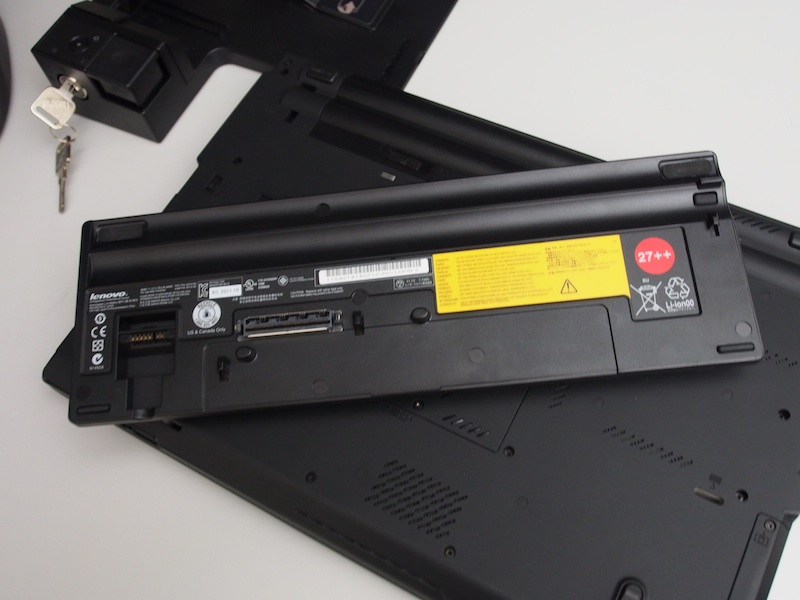
Thinkpad Slice 27 ++ battery review

Lenovo sells a 9-cell slice battery for their T and W series laptops. I haven't seen many pictures of it online so I figure I share it here. The battery is called the Slice 27 ++. There are other versions for the X220/X230 and older model Thinkpads. It uses the docking port connectors and is a great investment for those who want extended portable power.


On a Thinkpad T420 with the standard 6 cell, the slice gives me a total run time of about 14-15 hours under Ubuntu 12.04.  This is with moderate power management.

Since it uses the same dock connectors, you can't use simultaneously with a docking station. You will have to unplug it in order to re-dock with a docking station.

The battery is very hefty and lifts the laptop up quite into a more ergonomic position.  I can't really complain about the weight because it gives me an all day power.

Here are some pictures to help those considering this battery.


Wednesday, June 6, 2012

Thinkpad T420 Impressions


Right about now, manufactures are releasing a bunch of new Ivy Bridge laptop models. With that said, it is a great time to get major discounts on last generation Sandy Bridge models. Ivy Bridge promises to be 10-20% faster but is it worth the 40% premium when there are significant savings on the last gen core Sandy Bridge?

I recently took advantage of those major discounts during the Memorial Day close-outs and picked out a Thinkpad T420 with a corporate discount. I'm glad I got the T420 over waiting for the newer T430.
Most notable change in the newer models that will infuriate traditional Thinkpad loyalists, Lenovo is abandoning the traditional keyboard for the island chicklet style. With that change and the major discounts ($800 or so w/ tax and shipping), I could not resist.


I intend to run a Linux workstation with multiple virtual machines so I had the following requirements:

  • Higher than 1366x768 resolution screen. Check! The T420 comes with a 1600x900 display.
  • More than 8GB of RAM. Check! My T420 runs 16GB.
  • Processor support for advance virtualization. Check! i5-2540M has VT-D/VT-X support for hypervisors.
  • The ability to run WQHD (2560x1440) monitors or higher. Or the ability to run two FHD(1980x1080). Check! T420 has displayport and I wanted to avoid HDMI and its limitations.
  • Expansion, docking, and modular drive expansion bays. Check! The Thinkpad can use a docking station that has multiple video outs. The Ultrabay allows me to swap out drive caddies.I intend to run three SSD drives on the machine. 256GB SSD in the main drive bay for the OS, 32GB mSATA in the PCIe slot for swap/VM,  750GB Seagate Momentus Hybrid in the ultraboy.The 34mm express port will allow me to attached a eGPU (external GPU card via express-to-PCIe) to power even bigger and more monitors.


When you look at all my requirements, the Lenovo Thinkpads hit all the right notes. Ultrabooks were out of the question.

The beefier workstation class laptops like the W520 are nice all and with their FHD screens but I explicity wanted the easiest Linux laptop to run multiple 27" and higher displays.
The W520 can run 32GB of RAM in a quad-core configuration but the discreete optimus switching graphics is problematic with Linux and multi-monitor setups involving displayport/dual dvi.
Furthermore, the weight,enormous girth,and bricky 170 watt power supply, and short battery life of the W520 turned me back to the T420. And on a surprising note and unexpected advantage, the T420 is easily hackintoshable if that matters.

So, the T420 or the T520 seems to be the most ideal laptop for my usage. If you are a power user with similar requirements, look no further than the Thinkpads.


 Pictured: Ubuntu 12.04 running a Apple 30" Cinema Displat at 2560x1600


What can I say? In a nutshell, it is a "real" Thinkpad. You either like the looks or you don't. If you think the machine looks dated or old school, then this is not the laptop for you.
To me, it has an intangible elegance to it. The spartan, all black, matte professional appearance screams enterprise ready.
This is a professional workhorse and it makes no excuses for it. The only visual cues that separates this from a 10 year old Thinkpad are the video display port, e-sata jack, and the various inside Intel stickers.
So far, Lenovo has done a good job of not messing  up IBM's iconic design.

I'm currently working on various deadlines so I haven't had time to set it up and play with it. In the coming days/weeks, I will follow up on my experiences with it running Linux.
I have the mini dock 3 (433710U ThinkPad Mini Dock Series 3), various ultrabay caddies, monitors, and various drives ready to go. I'm most interested in seeing hack together an eGPU (external graphics card) to it.

It will be interesting to see how well it compares with the upcoming, revised quad core Ivy Bridge Retina Macbook Pro 15" that I will be getting from work.
Between 4/5 high res monitors and 2 powerful laptops on my desk, it will be computing nirvana this year.

Post blog notes:

I got it running the 30" Cinema Display using display-port from the laptop and the dock with the basic install of Ubuntu 12.04. No hassles, No xorg config files. It was able to play a 720p MKV on the 2560x1600 display while running a Virtual Machine, compiling, and cloning DD the Windows partition. Impressive and hassle free Linux experience.


(pictured above is the dock with the various ports)