Showing posts with label AX88179. Show all posts

Friday, April 19, 2013

Thunderbolt Gigabit vs USB 3.0 Gigabit (AX88179)


So I got myself an Apple Thunderbolt Gigabit adapter for my Macbook. I also have four Rosewill USB 3.0 Gigabit adapters using the popular (AX88179 USB 3.0 Ethernet controller).
So how do they compare?

First of all, both retail for the same price at $29. The Rosewill can be had for $22 on sale and as low as $17 on rare instances. There are other USB 3.0 gigabit adapters that sell for much, much more. However, the bottom line is they most likely use the same ASIX AX88179 chipset. You'll end up installing the ASIX drivers if you want to run them in OSX.
I've been using the ASIX based USB dongle for months. I have one dongle at each location and I even use it with my Linux based Thinkpad and various other computers. So, the USB 3.0 dongle will have more portability and wider use.

However, the USB 3.0 dongle isn't without problems. It disconnects on various occasions. When connected to a USB hub, it will disconnect if the USB bus is saturated with other devices. For example, large USB disk copies will disconnect the ethernet. This problem happens on other computers and different operating system so it is not unique to OSX.

Next, on Mac OSX, hot-plugging requires a work-around. If you plug the USB dongle after the machine boots or after you wake from sleep, the dongle does not work.
This problem doesn't exist on Windows/Linux. However, I found a work around by running a bash shell script that unloads and loads the OSX kext. This works pretty well but I can see where another user without the same level of technical acumen can get frustrated.

The Apple Thunderbolt differs from this particular dongle. First of all, it is short. I don't understand why manufactures who make USB Ethernet dongle feel the need to make long USB extension cable when you'll be plugging an Ethernet cable. Secondly, there are no drivers with OSX. It is plug-n-play. There is none of the hot-plug or sleep issues. It takes a second for the Thunderbolt adapter to be recognized and it simply works. Next, it has more configurability  You can do advance tweaks like jumbo frames and changing your MTU. It used the PCI-E lane of Thunderbolt so it feels and acts like a real Ethernet card instead on an adapter.

Performance:
Both work pretty much the same in terms of speed. Using iperf, I was getting 111-115 MB/sec transfers on both. However, the Thunderbolt does not disconnect under heavy load.


The USB 3.0 uses a little more resources in terms of CPU utilization: 30% vs 22% on the Thunderbolt.
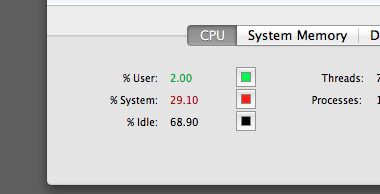


(usb)


(thunderbolt)


Conclusion:
It is a toss-up. I personally think the USB 3.0 is a better buy. USB works with any computers whereas Thunderbolt is mostly an Apple-centric market. Furthermore, since Thunderbolt allows chaining, the Apple gigabit adapter needs to be at the end of the chain. Some macs only have one thunderbolt port so it is a very precious port. The USB dongle can be plugged into a USB hub so that isn't a big issue. However, I like the smaller foot-print of the Thunderbolt adapter and it will be something I throw into my backpack.


Wednesday, March 20, 2013

Cheap USB 3.0 Gigabit adapter for the new Macbook Pros

Need a USB 3.0 Gigabit adapter for your new Macbook Pro, Macbook Retina or new Macbook Air?
Especially, if you don't want to sacrifice that precious Thunderbolt port or rely on Apple's 10/100 ethernet USB dongle? Well, any pretty much any ASIX AX88179 Chipset USB 3.0 to Gigabit adapter will work. There are scores of them on Amazon, Ebay and NewEgg.

They come in different colors, different packaging from different manufactures. However, they all have pretty much the same guts. A while back, I reported having a DOA, bad experience with an Anker USB 3.0 Gigabit adapter. Today, I am reporting better luck with a NewEgg Rosewill adapter using the same ASIX AX88179 chipset.

I recently picked up a few for $17 on sale (regularly $28) at Newegg.


The RNG-406U is a standard, sturdy dongle. In fact, it looks more attractive than the Anker that failed me prior.

After opening the box, I quickly loaded up the latest driver from ASIX's website and got my Gigabit speeds. I tested under Mountain Lion 10.8.2 and it works as advertised. I also have the white Apple USB 2 10/100 ethernet dongle and that thing is pretty slow. Under testing, the Rosewill Gigabit adapter  was hitting 117 MB/sec using iperf so I am definitely hitting Gigabit's maximum theoretical limit (of 125 MB/sec). In fact, it was just as fast as the internal gigabit on my Macbook.


I even plugged it into my Thinkpad T420 running Ubuntu via a USB 3.0 expresscard and was able to make install the drivers easily. I can confirm it works pretty good under Unbutu 12.04 after installing the kernel drivers. So far, so good. A USB gigabit dongle that works on multiple platforms. I ended up buying three more to leave at different locations. I'm always developing server apps and usually need a few network ports for testing.

One big major issue. Of course, I wouldn't do you guys a service if I didn't acknowledge one glaring issue.

The main issue with this dongle (that I will show how to easily resolve) is the fact, you need to have it plugged in at boot.

If you unplug and replug later, it will not work again. If your machine is already booted or just recovered from sleep, the dongle will not work. The operating system will recognize the dongle but no connection. I usually never shut down or reboot my mac. If I am transporting from home and work, my machine usually just goes to deep sleep. Hence. this was an issue I wanted to resolve.

Now, under most circumstances a simple command line:  sudo ifconfig enX down and ifconfig enX up cures all the problems. However, simply restarting the network interface does not work.

To solve this problem, simply unload and reload the kernel kext file (OSX driver). It is located in the plugin folder of the IONetworkingFamily inside System/Library Extensions.

To unload, type in the terminal :

 sudo kextunload /System/Library/Extensions/IONetworkingFamily.kext/Contents/PlugIns/AX88179_178A.kext  

Then to reload, type in the terminal:

 sudo kextload /System/Library/Extensions/IONetworkingFamily.kext/Contents/PlugIns/AX88179_178A.kext  

This will fix it. Simple isn't it? I just make a .bash script and leave it in my home directory and drag-n-drop it into the terminal to run. Voila, working dongle again.


There you have it. A cheap USB 3.0 Gigabit solution. I've even seen a few ASIX AX88179 dongles that are built in 4-5 port hubs. I may try that next.